
Test automation, without the overhead.
Upload your test scenarios as a simple Markdown file. TestAutomationGenius parses, validates and runs every scenario step-by-step directly in your browser: no frameworks, no config, no boilerplate.
Covering three critical STLC phases.
TestAutomationGenius slots into the phases where manual effort is highest: designing your test scenarios, developing the automation layer and executing tests at speed.
Write scenarios in plain Markdown. Each scenario maps directly to user flows and acceptance criteria.
AI validates and fixes your scenario files. Groq runs corrections without writing a line of code.
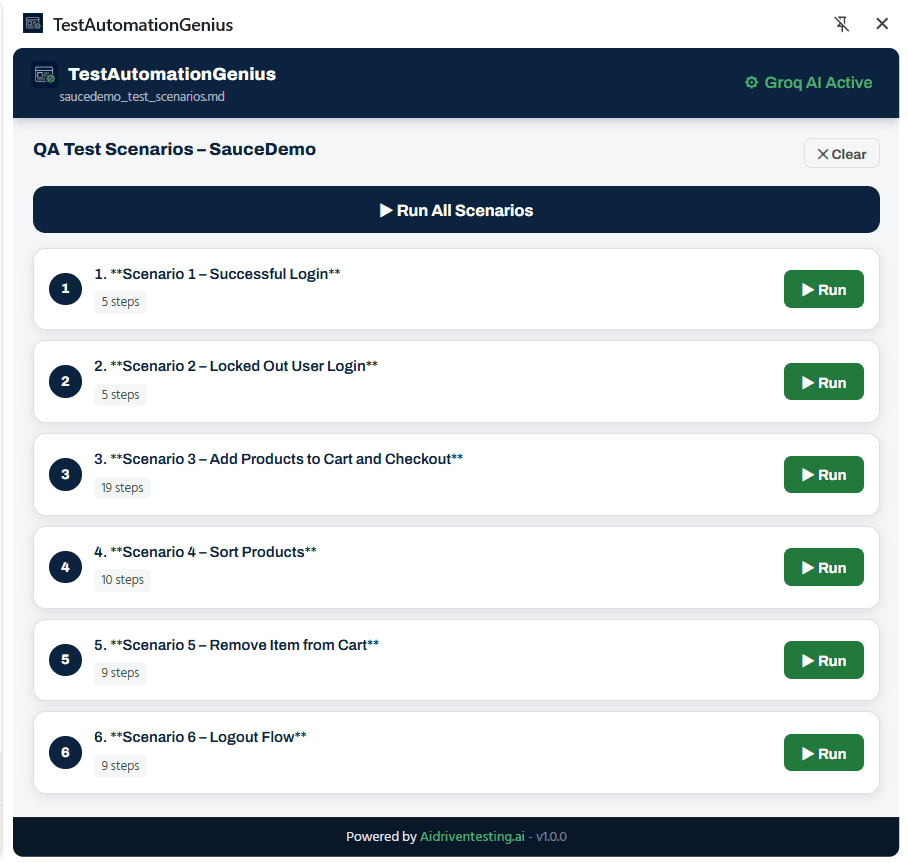
Run all scenarios or individual steps. Track progress, pause, abort and mark results in real time.
From scenario file to test results in three steps.
No configuration, no framework setup. Write your scenarios once, run them anywhere.
- Test Design - Phase 031
Write your scenarios
Create a .md file with your test scenarios in plain Markdown. Each scenario lists numbered steps, just like a manual test case. No special syntax to learn.
- Automation Development - Phase 052
Upload and validate
Drop the file into the extension. It validates the format instantly. If anything is missing or malformed, AI suggests and applies the exact fix, or you edit it yourself with guided hints.
- Test Execution - Phase 063
Run and record results
Execute all scenarios at once or pick individual ones. Watch each step execute in real time with a live progress bar, then mark scenarios as passed or failed, with the option to rerun instantly.
Every screen, designed for testers.
Upload your scenario file
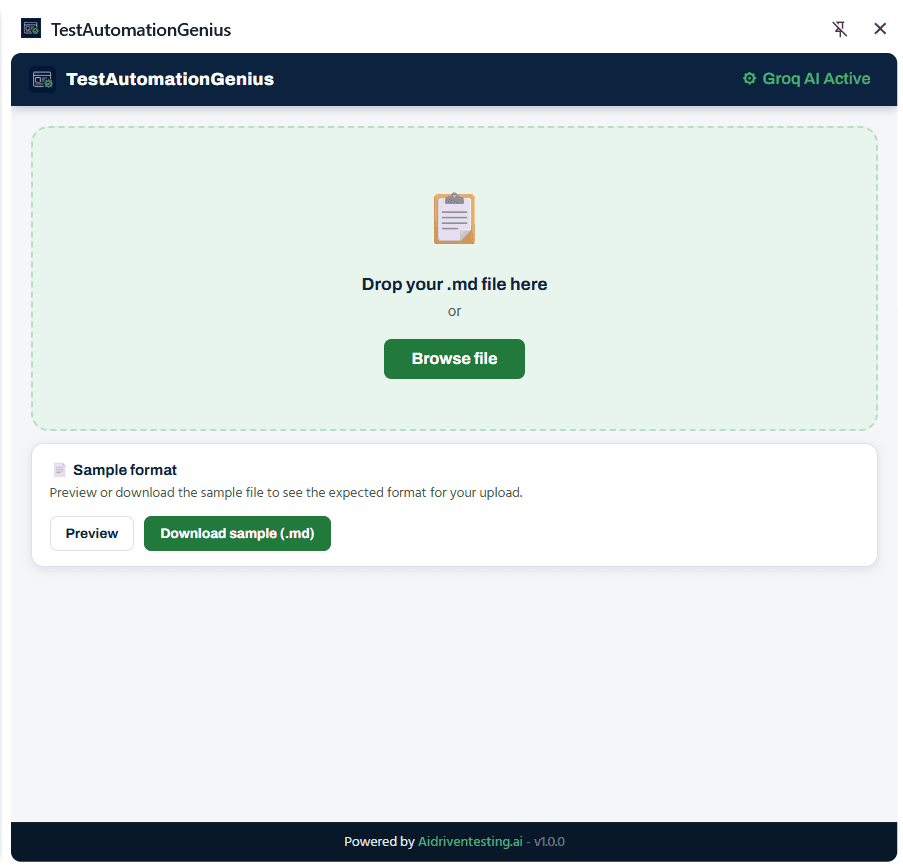
Drag and drop your .md file into the extension. A sample file is always available so you can see the expected format before writing your own scenarios.
- Drag-and-drop or browse to upload
- Sample file downloadable in one click
- Groq AI status shown in the header
- Format validated immediately on upload
Intelligence built into every step.
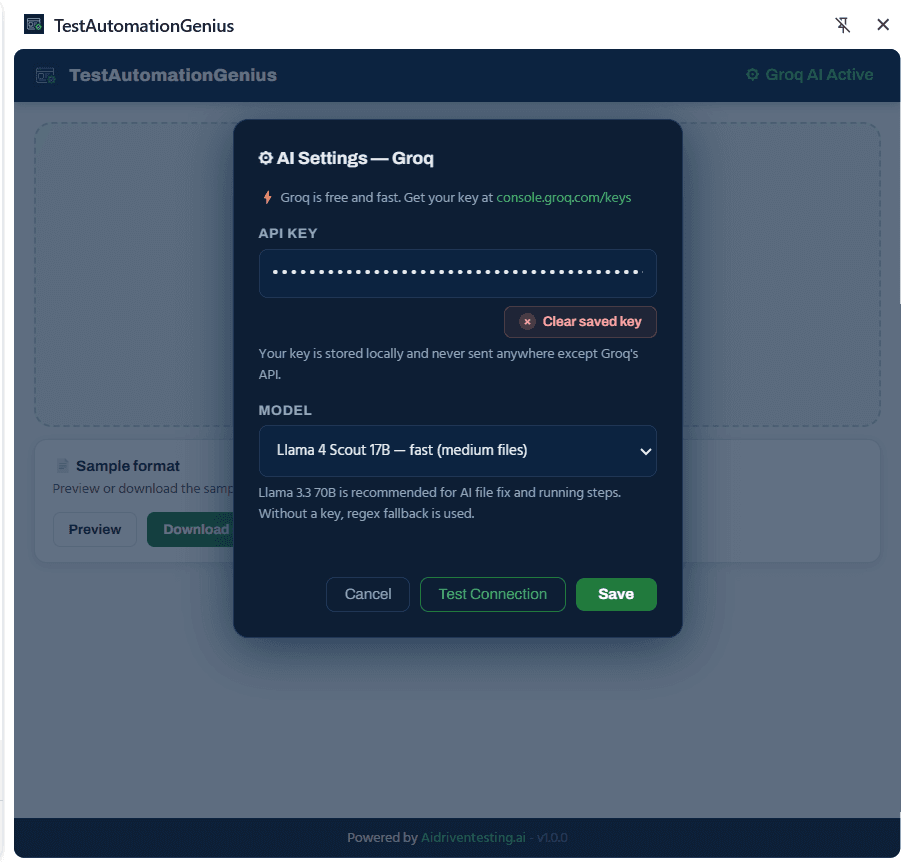
Groq is free, fast and privacy-safe. Your API key is stored locally and never leaves your machine, only sent directly to Groq's API.
Fix with AI
When your scenario file fails validation, Groq reads the error, generates the correction and patches the file. Review the before-and-after diff, then load the fixed scenarios directly.
Fix yourself
Prefer to stay in control? Switch to the manual editor. The exact issue is highlighted, the suggested fix is shown inline, and you edit the scenario text directly before revalidating.
Model selection
Choose your Groq model based on file size and speed. Llama 4 Scout 17B for medium files, Llama 3.3 70B for thorough AI fix and step-running. Without a key, regex fallback keeps things running.
Set up once, use everywhere.
Get a free API key at console.groq.com/keys. Paste it into the AI Settings panel, test the connection and save. Your key is stored locally in the extension and never shared with anyone.
No AI key? No problem. The extension uses a regex fallback so you can still validate and run scenarios, AI features activate automatically once a key is saved.
Plain text. Powerful execution.
Your scenario file is just a Markdown document. Write it in any text editor, store it in your repo, share it with your team. TestAutomationGenius reads it and turns it into an executable test suite automatically.
- One .md file holds all your scenarios
- Each scenario is a numbered Markdown heading
- Steps are plain numbered lists under each heading
- URL and metadata go at the top as key-value pairs
# QA Test Scenarios - SauceDemo

**URL:** https://www.saucedemo.com/
**Type:** e-commerce demo for UI test automation

## Test scenarios

### 1. Successful Login
1. Navigate to https://www.saucedemo.com/
2. Enter username `standard_user`
3. Enter password `secret_sauce`
4. Click **Login**
5. Verify Products page loads
Frequently asked questions
Ready to automate your test execution?
TestAutomationGenius is available now as a free beta on the Chrome Web Store. Install it, try it on your own scenarios, and let us know what you find.